
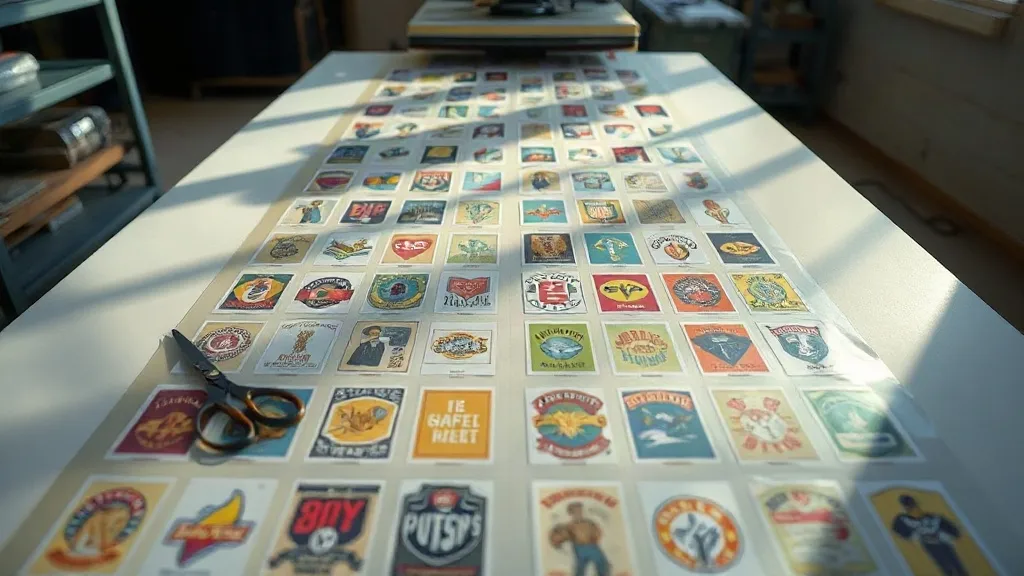
Most print shops discover the economics of heat transfers the hard way: the first time a single small logo order eats an entire sheet of film and a full pass through the printer. That moment usually sends people looking for a better system, and it almost always leads to the DTF Gangsheet. Instead of running one design at a time, you fill a long sheet with many jobs, print it in one go, and cut the cost of every transfer that comes off the platen. The concept is simple. The execution is where shops either save real money or waste it.
This guide is written for the person standing at the printer at 7 a.m. with a queue of orders and a roll of film. We will cover how gangsheets actually reduce cost, how to build a layout that survives the press, and the small decisions that separate a tight sheet from an expensive mess.
What a DTF Gangsheet Actually Is
A gangsheet is a single, long print file that combines multiple designs onto one continuous sheet of DTF film. You are not printing one transfer per job. You are printing a batch, then trimming each design out afterward. The sheet can run a meter long or several meters, depending on your printer and your order volume.
The value comes from two places. First, film and powder are consumed per square meter, not per design, so unused space is money burned. Second, printer time is fixed per pass. A sheet packed with 40 small logos takes roughly the same machine time as a sheet with 6 large ones. Packing efficiently means more sellable output for the same hour of labor and the same run through the shaker.
How it differs from printing one design at a time
Single-design printing is fine for a large back print or a one-off sample. It becomes inefficient the moment your orders are small: names on jerseys, chest logos, sleeve badges, pet tags, tote bag graphics. Those jobs rarely fill a sheet on their own, so the leftover film becomes waste. A gangsheet turns that leftover space into product.
The Real Cost Math Behind Gangsheets
Shops often quote transfer pricing without accounting for film waste, and that is where margins disappear. A simple way to see it is to calculate your cost per square meter of printed film, then divide by how much of that square meter is actually sellable artwork.
- Film and powder: consumed across the whole sheet, including empty gaps.
- Ink: mostly tied to printed area, so white underbase coverage matters.
- Machine time: fixed per run, which rewards fuller sheets.
- Labor: trimming and pressing scale with the number of pieces, not sheet length.
If 70 percent of your sheet is artwork and 30 percent is gap, you are paying for 30 percent of nothing. Getting that artwork coverage above 85 percent is a realistic target with decent nesting, and it changes your cost per piece noticeably. On a busy week, that difference funds a lot of consumables.
Building a Layout That Survives the Press
A layout that looks great on screen can still fail at the heat press. The trick is to design for the physical process, not just for the file preview.
Leave room for trimming
Every design needs a cutting margin. If two graphics sit flush against each other, your trimmer has no safe line to follow and you risk slicing into artwork. A gap of a few millimeters between designs is usually enough, but small pieces with tight detail deserve more breathing room.
Group by transfer size, not by order
Nesting works best when similar shapes sit together. Cluster small chest logos in one zone and large back prints in another. Mixing a giant design into a field of small ones creates awkward gaps that are hard to fill later.
Rotate to fill dead space
Long, narrow designs are the enemy of efficient packing. Rotating a banner-shaped graphic 90 degrees can open up a block of usable space. Do this deliberately and keep a note of rotation in your production file so the trimmer knows what to expect.
Keep white underbase coverage in mind
Large solid areas of white underbase drink ink. If a design has a big white fill on a dark garment, it will cost more than a design with the same footprint but lighter coverage. When you are deciding what to place in a gap, a low-coverage design is often the better filler.
Common Mistakes That Waste Film and Time
The same handful of errors show up in almost every shop that is new to gangsheets. Catching them early pays for itself.
- Packing to the edge. Printers need a gripper margin. Artwork placed too close to the leading edge can smear or fail to register.
- Forgetting the cut file. A gangsheet without registration marks or a matching cut layout turns trimming into guesswork.
- Mixing incompatible fabrics in one batch. Press settings differ for cotton, polyester, and blends. Batching by fabric keeps your settings consistent.
- Overfilling to save a meter. A sheet so dense that trimming takes twice as long is not a saving. Labor is a real cost.
- Skipping the test press. New film, new powder, or a new garment supplier can change how a transfer releases. Press one piece before you commit the whole sheet.
Workflow Tips From the Production Floor
Efficiency on a gangsheet is mostly about rhythm. A few habits make a real difference over a month of production.
- Build sheets the day before you print, so you can nest with fresh eyes and catch layout problems before the printer warms up.
- Keep a running list of small orders that are waiting for a sheet to fill. When a big job leaves a gap, those small pieces slot in.
- Label each trimmed transfer with the order number on the backing paper, not on the printed side.
- Store trimmed transfers flat and away from humidity. Powder absorbs moisture and release quality drops.
- Track your artwork coverage per sheet for a month. The number is usually lower than people expect, and it shows exactly where to improve.
When a Gangsheet Is the Wrong Choice
Batching is not always the answer. If a customer needs a single sample before approving a bulk order, printing a full sheet to produce one transfer is wasteful. The same goes for designs with unusual dimensions that would force awkward gaps around them. In those cases, a short dedicated run is cheaper than a clever layout that leaves half the film empty. The skill is knowing which jobs belong in the batch queue and which ones deserve their own pass.
Frequently Asked Questions
How many designs can fit on one DTF gangsheet?
It depends entirely on design size and how well they nest. A sheet filled with small chest logos can hold dozens of pieces, while large back prints may only fit a handful. Focus on artwork coverage percentage rather than a fixed count.
Can I mix different garment types on the same gangsheet?
You can print them together, but pressing is where it matters. Cotton, polyester, and blends need different temperature and pressure settings, so group transfers by fabric type during production to avoid re-pressing mistakes.
Does a gangsheet reduce the quality of each transfer?
No. Each design is printed at the same resolution as it would be on its own. Quality issues usually come from the artwork file itself, poor powder application, or incorrect press settings, not from batching.
How much space should I leave between designs for cutting?
A few millimeters is generally enough for clean trimming, but add more around small pieces with fine detail. If your trimmer is manual, wider gaps reduce the risk of clipping artwork.
Is it worth building a gangsheet if I only have a few small orders?
Sometimes it is better to wait and accumulate orders until the sheet is reasonably full. Printing a mostly empty sheet defeats the cost advantage, so queue small jobs and fill gaps as larger runs come through.